Keep your Field Nation integration syncing when you migrate your ServiceNow instance to the Australia release — prevent and fix the domain-related sync failure.
This guide covers a ServiceNow-specific upgrade precaution. For connector setup and roles, start with the Overview and Configuration pages.
Migrating your ServiceNow instance to the Australia release does not break the Field Nation integration on its own. The risk is in the migration process: it can move your integration's API user out of the global domain. When that happens, the user silently loses the permissions it needs, data stops flowing from Field Nation into ServiceNow, and you see what looks like an authentication or business-rule error.
Two things are required when migrating to Australia:
useraccount to the OAuth Auth Scopes in the ServiceNow Application Registry record.Before migrating to Australia, note your Field Nation API user's current
domain and confirm it again afterward. The user must remain on global (or
their pre-migration domain) — any domain change during the migration causes a
silent permission loss that breaks the integration. You must also add
useraccount to the OAuth Auth Scopes in the Application Registry as part
of the migration.
After migrating a sandbox or production instance to Australia, the integration stops working in one or more of these ways:
Populate Group - Dispatch/Work rule, which blocks the update.These look like three different problems — authentication, business rule, field mapping — but they almost always trace back to a single cause: the API user's domain changed during the migration.
ServiceNow uses domain separation to partition data and permissions. A user on the global domain can see and act on records across the instance. A user moved into a sub-domain (for example, TOP/<Company> Data Integrity) only sees what that sub-domain allows.
During an Australia migration, the Field Nation API user can be moved out of global into a sub-domain. Once that happens, the user loses permission to read valid assignment groups. The out-of-the-box Populate Group - Dispatch/Work business rule then fails its validation — and because that rule blocks the write, every Field Nation → ServiceNow update fails.
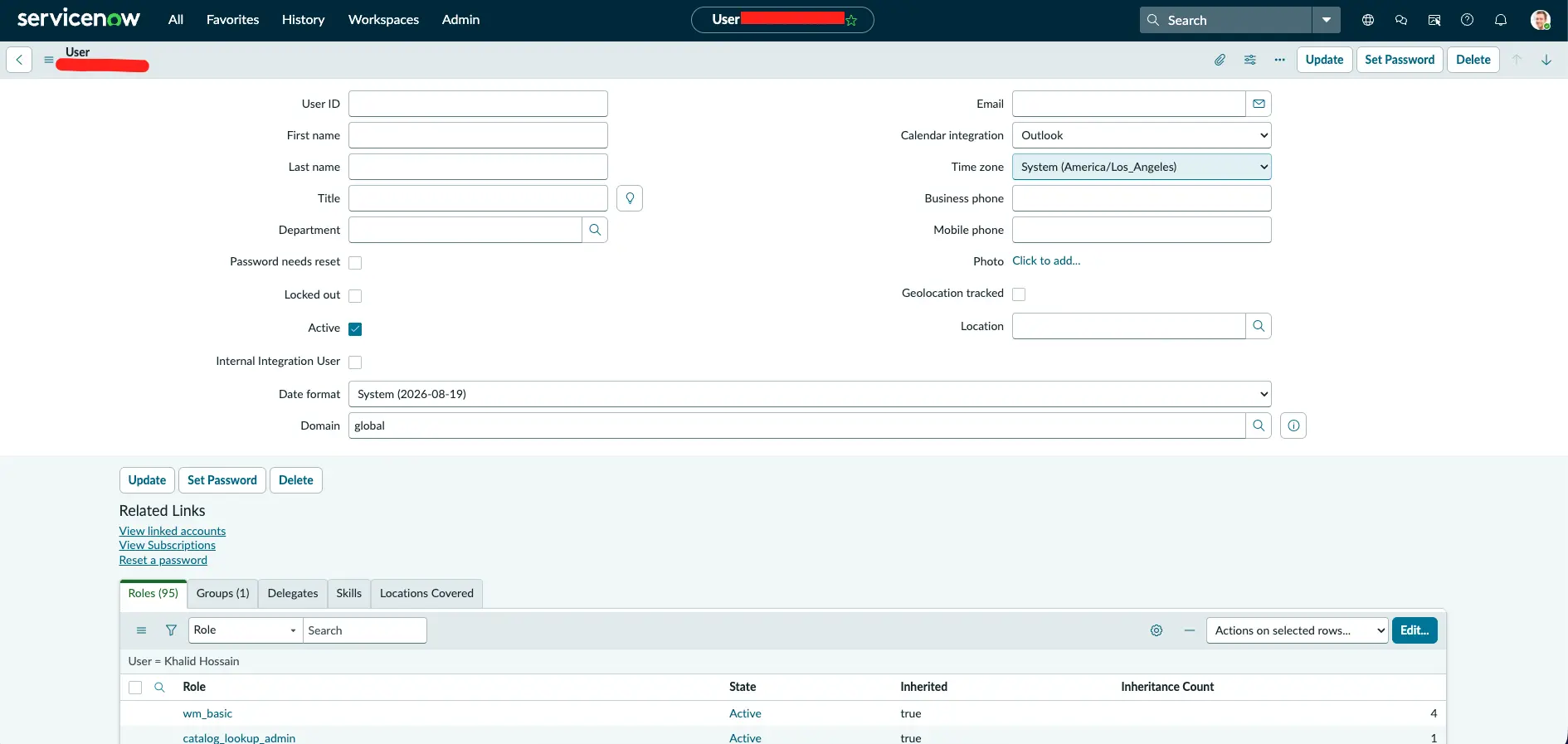
Menu labels vary slightly by ServiceNow release. If you don't see Configure → Form Layout, use the gear / personalize icon on the form header to add the Domain field.
useraccount to the OAuth Auth ScopesThe Australia release requires useraccount to be present in the Auth Scopes section of the OAuth Application Registry record.
useraccount in the Auth Scope field.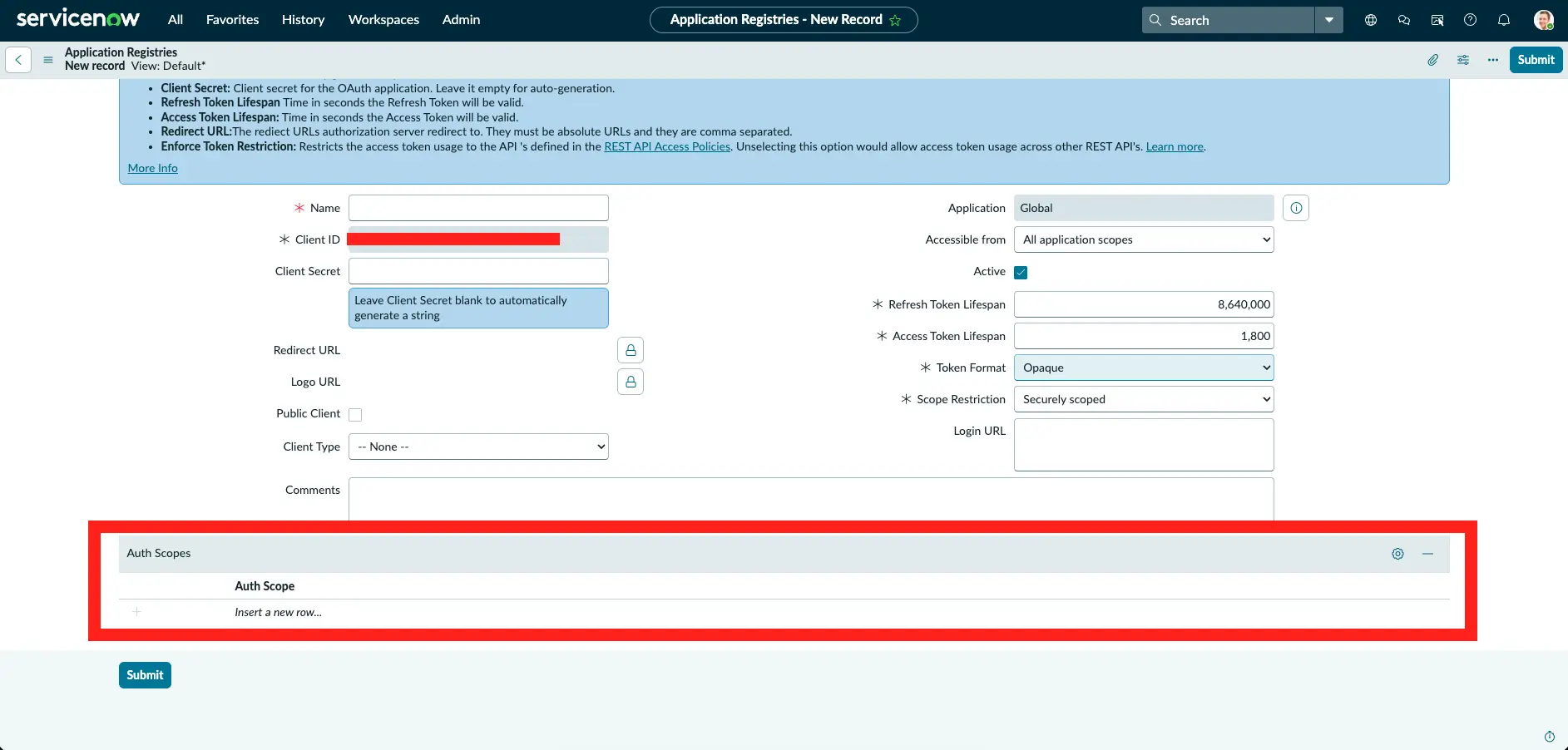
Moving a user between domains can require re-setting the password and re-selecting the company. If so, set them — then update the same credentials on the Field Nation settings page.
If anyone hard-coded Assignment Group or Assigned To values in the Field Nation integration mappings while troubleshooting, remove them. They are not needed once the domain is correct, and they mask the real behavior. Field mapping should look exactly as it did before the migration.
Run the verification steps below to confirm both directions sync.
Do not disable or modify the Populate Group - Dispatch/Work business
rule to work around this. It fails because of the permission loss, not because
the rule itself is wrong. Fixing the domain fixes the rule.
When the integration breaks right after a migration, it's tempting to assume the new release changed the API contract. In this case it didn't:
useraccount to the OAuth Auth Scopes on the Application Registry record as part of the Australia migration.Run this on your sandbox first, then production:
wm_dispatcher, and any others your setup requires). See the roles matrix.useraccount to the OAuth Auth Scopes on the Application Registry record as part of the migration — this is required for Australia.Run these in order. If step 1 passes but step 2 fails, the problem is almost certainly the domain — go to The fix.
Open the Field Nation ServiceNow settings page and click Save. A successful save means OAuth is working.
https://ui-sandbox.fndev.net/integrations/fieldservices/servicenow/settingshttps://app.fieldnation.com/integrations/fieldservices/servicenow/settings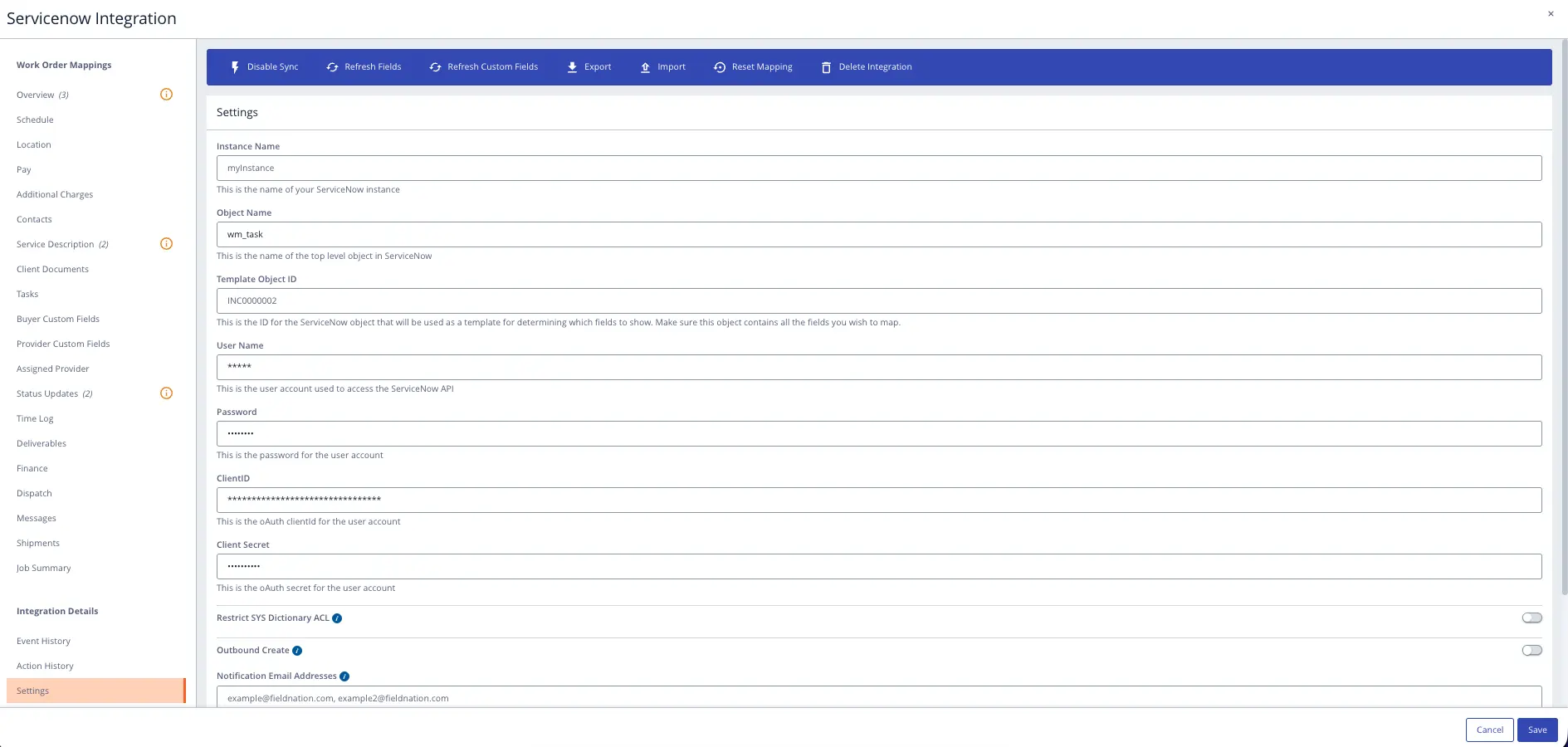
Before testing, confirm you have completed Step 2 of the fix:
the OAuth Application Registry Auth Scopes must include useraccount for
Australia. If this step fails after confirming the auth scope, see the
Authentication fails FAQ.
Create a Work Order Task (wm_task) in ServiceNow and send it to Field Nation. Confirm the work order is created.
Update a work order from the Field Nation side and confirm the change flows back to the ServiceNow record without a business-rule error.
If all three pass, the migration is complete and the integration is healthy.
If the integration still isn't syncing after confirming the API user is on the global domain, create a support ticket or reach out to your Account Manager, who can loop in a Field Nation solution engineer to troubleshoot.
Last updated on
