Automatically create Field Nation work orders from ServiceNow Work Order Tasks using Business Rules and REST Messages.
The ServiceNow connector automatically creates Field Nation work orders when a Work Order Task (wm_task) reaches a dispatch-ready state. A Business Rule in ServiceNow detects the state change and sends a notification to Field Nation, which fetches the full record and creates a work order — no manual re-entry required.
This connector also supports the incident table. The setup steps are
identical — only the table name and filter conditions differ.
Authentication
OAuth 2.0
Primary table
Work Order Task (wm_task)
Trigger mechanism
Business Rules + REST Messages
Data flow
Bidirectional (status, notes, attachments, messages)
A Work Order Task changes to Pending Dispatch. Your Business Rule detects this and executes a REST Message.
The REST Message sends the record's sys_id to your unique Field Nation trigger URL.
Field Nation authenticates back to ServiceNow and retrieves the full record, including related table fields.
Field mappings transform ServiceNow data into a Field Nation work order. A correlation ID links the two records for bidirectional sync.
Dispatch Field Nation work orders automatically when a wm_task record reaches a dispatch-ready state — no manual hand-off required.
Filter which tasks reach Field Nation using Business Rule conditions — dispatch only tasks that meet criteria such as category, location, or assignment group.
When a Field Nation work order status changes — assigned, work done, or cancelled — the Integration Broker sends an outbound update back to the originating wm_task record via the REST Table API.
Notes added in Field Nation sync to work_notes in ServiceNow, and attachments added to either side sync to the other — keeping both records aligned throughout the work order lifecycle.
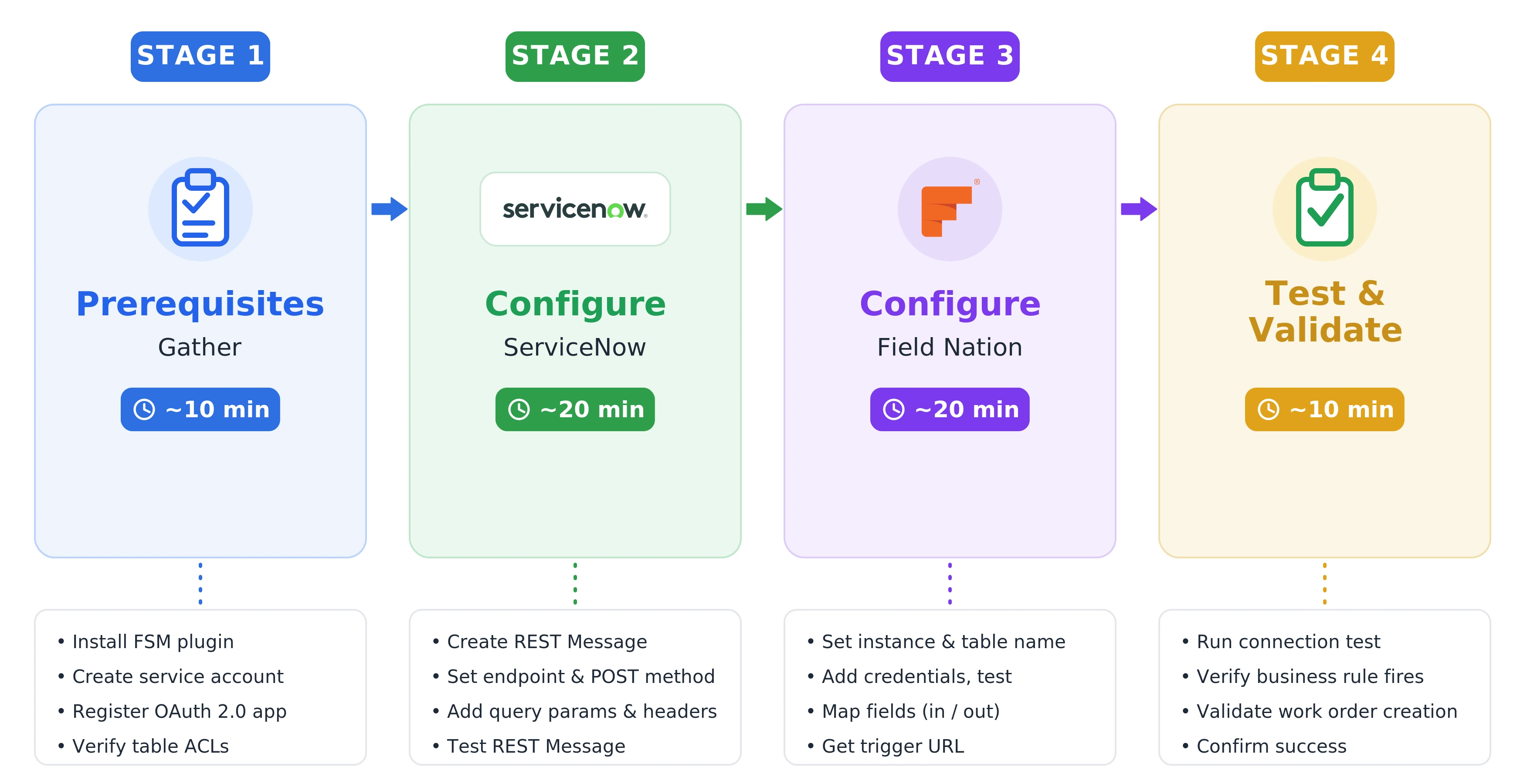
The full integration takes approximately 60 minutes from start to first successful work order.
| Stage | Who completes it | Estimated time |
|---|---|---|
| Stage 1 — ServiceNow prerequisites | ServiceNow administrator | ~20 min |
| Stage 2 — Configure Field Nation connector | Field Nation administrator | ~15 min |
| Stage 3 — Workflow setup in ServiceNow | ServiceNow administrator | ~15 min |
| Stage 4 — Test and validate | Both administrators | ~10 min |
Stages 1 and 3 require ServiceNow admin access. You can hand off the Prerequisites section and the Workflow Setup page to your ServiceNow administrator to complete independently.
Complete the checks below before starting Configuration. The ServiceNow prerequisites (Stage 1) must be completed by a ServiceNow administrator and can be handed off to them independently.
Progress is saved in your browser. Run this checklist once per environment (sandbox then production).
Complete these steps in ServiceNow before configuring the connector in Field Nation.
An active ServiceNow instance with admin access is required.
The wm_task table requires this plugin to be active.
com.snc.work_managementCreate a non-personal, non-interactive integration user. The connector authenticates as this user.
integration.fieldnation)| Role | Purpose | When required |
|---|---|---|
wm_dispatcher | Read/write wm_task records (unscoped) | Always (base role) |
wm_admin | Full CRUD on wm_task — includes record creation | Only if Outbound Create is enabled (replaces wm_dispatcher) |
itil | Read/write attachments via sys_attachment | Only if attachment sync is enabled |
personalize_dictionary | Field discovery via schema tables | Only if Template Bypass is OFF |
snc_platform_rest_api_access | Allows Field Nation to send bidirectional updates back via REST Table API | Only if the Table API ACL is activated on the instance (off by default) |
Keep this service account on the global domain. If a release migration (for example, to the Australia release) moves it into a sub-domain, the integration can lose required permissions and updates may fail (often showing up as auth or business-rule errors). See Australia Release Migration before and after migrating to the Australia release.
The roles above satisfy standard ACLs. In a customized environment, confirm these tables are accessible:
| Table | Access | Purpose |
|---|---|---|
wm_task | Read + Write | Bidirectional work order sync |
sys_attachment | Read + Write | Upload/download attachments |
sys_db_object | Read | Field discovery (unless using Template Bypass) |
sys_dictionary | Read | Field discovery (unless using Template Bypass) |
sys_glide_object | Read | Field type resolution during discovery |
Each table the connector accesses must have "Allow access to this table via web services" enabled in ServiceNow Application Access settings. This is a per-table toggle — if disabled, API calls return errors regardless of role assignments.
Have these details ready before opening the Field Nation Integration settings. Fill them in as you go — your entries are saved in your browser and carry across the Configuration and Workflow pages.
Non-secret values are saved in your browser. Fields marked Not saved are held only until you reload — enter them directly into the connector form.
| Term | Definition |
|---|---|
wm_task | ServiceNow table for Work Order Tasks — the primary source record this connector reads from |
| Business Rule | A server-side script in ServiceNow that fires when a table row meets defined conditions |
| REST Message | A ServiceNow outbound HTTP call definition, configured with endpoint, headers, and body |
| Integration Broker | Field Nation middleware that receives inbound webhook triggers and orchestrates work order creation |
| Trigger URL | The unique HTTPS endpoint Field Nation provides for receiving webhook calls from ServiceNow |
sys_id | ServiceNow's 32-character unique identifier for any record — sent in the webhook payload |
| Field mappings | Rules in the Integration Broker that transform ServiceNow field values into Field Nation work order fields |
| Template Bypass | Alternative field discovery that reads from a sample record instead of schema metadata tables |
| Correlation ID | An identifier Field Nation attaches to a work order to link it back to the originating ServiceNow record |
| ROPC | Resource Owner Password Credentials — the OAuth 2.0 grant type this connector uses for authentication |
The integration is pull-based at its core: ServiceNow pushes a notification (the sys_id), and Field Nation pulls the full record. This means:
When Field Nation creates a work order from a ServiceNow trigger, it stores a correlation ID linking the two records. This ID is the mechanism for all bidirectional sync — status updates, notes, and attachments flow back to ServiceNow using this link.
The connector uses the Resource Owner Password Credentials (ROPC) grant. Field Nation stores the service account credentials and exchanges them for an access token against your instance's token endpoint (https://<instance>.service-now.com/oauth_token.do) on each authenticated request.
Once a work order is created, Field Nation sends outbound updates back to the wm_task record when work order status changes. The outbound field mappings in the Integration Broker control exactly which Field Nation fields update which ServiceNow fields.
Last updated on
