Understanding webhook states (active, inactive, archived), transitions, history tracking, and change auditing.
Definition: Webhook is fully operational and receiving event notifications.
curl -X POST https://api-sandbox.fndev.net/api/v1/webhooks \
  -H "Authorization: Bearer YOUR_ACCESS_TOKEN" \
  -H "Content-Type: application/json" \
  -d '{
    "url": "https://your-endpoint.com/webhooks",
    "method": "post",
    "status": "active",
    "events": ["workorder.status.published"]
}'Definition: Webhook is temporarily paused and not receiving events.
// Pause webhook during deployment
await fetch('https://api-sandbox.fndev.net/api/v1/webhooks/wh_abc123', {
  method: 'PUT',
  headers: {
    'Authorization': `Bearer ${accessToken}`,
    'Content-Type': 'application/json'
  },
  body: JSON.stringify({ status: 'inactive' })
});

// Perform deployment...

// Reactivate after deployment
await fetch('https://api-sandbox.fndev.net/api/v1/webhooks/wh_abc123', {
  method: 'PUT',
  headers: {
    'Authorization': `Bearer ${accessToken}`,
    'Content-Type': 'application/json'
  },
  body: JSON.stringify({ status: 'active' })
});# Quickly pause webhook during incident
curl -X PUT https://api-sandbox.fndev.net/api/v1/webhooks/wh_abc123 \
-H "Authorization: Bearer YOUR_ACCESS_TOKEN" \
-H "Content-Type: application/json" \
-d '{"status": "inactive"}'Best Practice: Use inactive for temporary pauses instead of deleting and recreating. This preserves:
Definition: Webhook is permanently deactivated and read-only.
curl -X PUT https://api-sandbox.fndev.net/api/v1/webhooks/wh_abc123 \
  -H "Authorization: Bearer YOUR_ACCESS_TOKEN" \
  -H "Content-Type: application/json" \
  -d '{
    "status": "archived"
}'Irreversible: Once archived, a webhook cannot be reactivated. Create a new webhook if needed.
Irreversible: Cannot undo archival. Consider using "Inactive" for temporary pauses.
| Action | Configuration | Delivery Logs | Reversible |
|---|---|---|---|
| Archive | Preserved (read-only) | Preserved | No |
| Delete | Removed | Preserved | No |
Recommendation: Archive webhooks instead of deleting to maintain audit trails.
active ⟷ inactive    ✅ Bidirectional
active → archived    ✅ One-way
inactive → archived  ✅ One-way
archived → active    ❌ Not allowed
archived → inactive ❌ Not allowed# Active → Inactive
curl -X PUT https://api-sandbox.fndev.net/api/v1/webhooks/wh_abc123 \
-H "Authorization: Bearer YOUR_ACCESS_TOKEN" \
-H "Content-Type: application/json" \
-d '{"status": "inactive"}'
# Inactive → Active
curl -X PUT https://api-sandbox.fndev.net/api/v1/webhooks/wh_abc123 \
-H "Authorization: Bearer YOUR_ACCESS_TOKEN" \
-H "Content-Type: application/json" \
-d '{"status": "active"}'
# Any → Archived (permanent)
curl -X PUT https://api-sandbox.fndev.net/api/v1/webhooks/wh_abc123 \
-H "Authorization: Bearer YOUR_ACCESS_TOKEN" \
-H "Content-Type: application/json" \
-d '{"status": "archived"}'Field Nation may automatically change webhook state under certain conditions:
Trigger: 7 consecutive days of failed deliveries
Action: active → inactive
Notification: Email sent to notificationEmail (if configured)
Reason: Prevent infinite retry loops on broken endpoints
Recovery:
# Fix endpoint issues first, then reactivate
curl -X PUT https://api-sandbox.fndev.net/api/v1/webhooks/wh_abc123 \
  -H "Authorization: Bearer YOUR_ACCESS_TOKEN" \
  -H "Content-Type: application/json" \
-d '{"status": "active"}'Important: Fix underlying issues before reactivating. Repeated auto-deactivations may result in webhook being permanently archived.
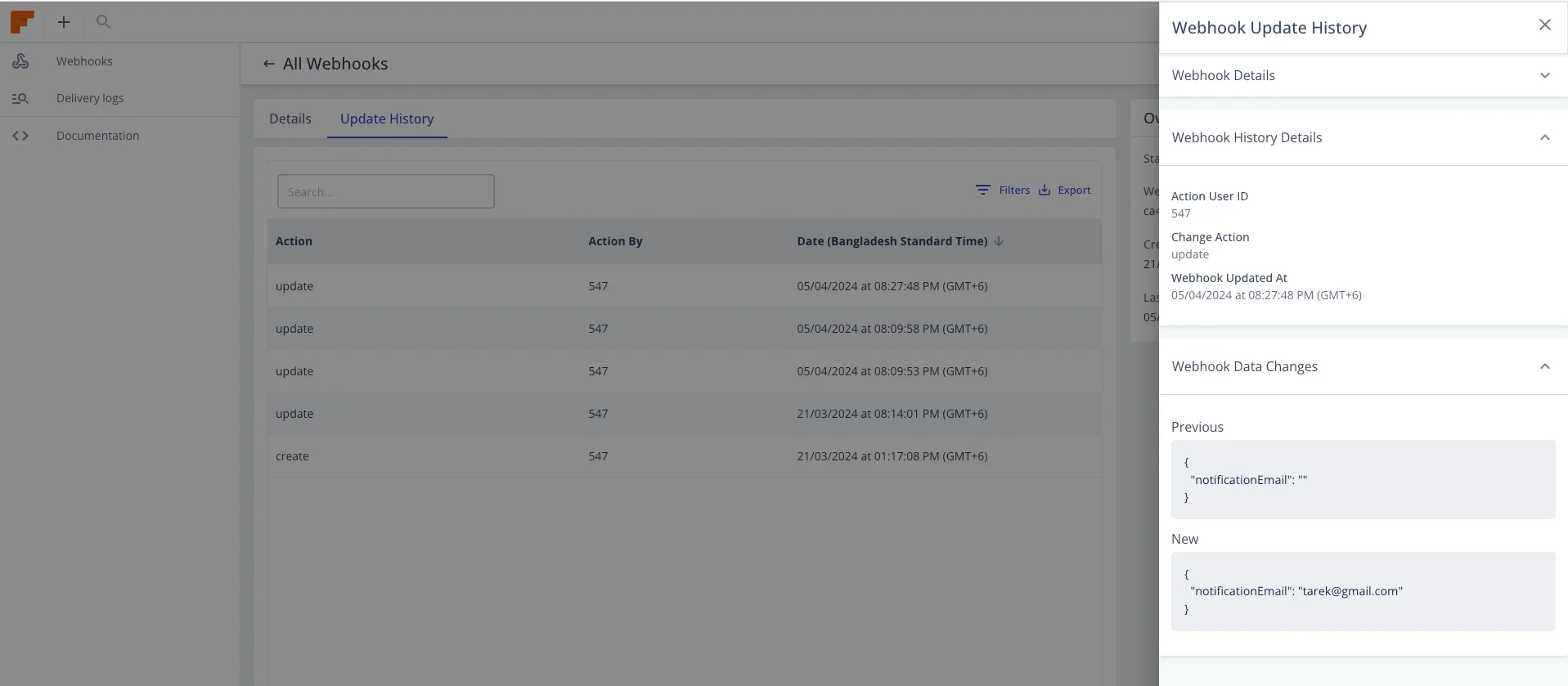
Every webhook modification is tracked in a comprehensive change history.
curl -X GET "https://api-sandbox.fndev.net/api/v1/webhooks/wh_abc123/history" \
  -H "Authorization: Bearer YOUR_ACCESS_TOKEN"
Response:
{
  "metadata": {
    "timestamp": "2026-01-15T11:00:00Z",
    "count": 5,
    "total": 5
  },
  "result": [
    {
      "id": 123,
      "userId": 456,
      "action": "status_changed",
      "changes": {
        "status": {
          "from": "active",
          "to": "inactive"
        }
      },
      "createdAt": "2026-01-15T10:45:00Z",
      "updatedAt": "2026-01-15T10:45:00Z"
    },
    {
      "id": 122,
      "userId": 456,
      "action": "events_updated",
      "changes": {
        "events": {
          "added": ["workorder.status.approved"],
          "removed": ["workorder.status.draft"]
        }
      },
      "createdAt": "2026-01-15T09:30:00Z",
      "updatedAt": "2026-01-15T09:30:00Z"
    },
    {
      "id": 121,
      "userId": 456,
      "action": "url_changed",
      "changes": {
        "url": {
          "from": "https://old-endpoint.com/webhook",
          "to": "https://new-endpoint.com/webhooks"
        }
      },
      "createdAt": "2026-01-14T15:20:00Z",
      "updatedAt": "2026-01-14T15:20:00Z"
    }
  ]
}
# Filter by user
curl -X GET "https://api-sandbox.fndev.net/api/v1/webhooks/wh_abc123/history?userId=456" \
  -H "Authorization: Bearer YOUR_ACCESS_TOKEN"

# Filter by action
curl -X GET "https://api-sandbox.fndev.net/api/v1/webhooks/wh_abc123/history?search=status_changed" \
-H "Authorization: Bearer YOUR_ACCESS_TOKEN"Configure an email to receive alerts:
{
  "notificationEmail": "webhook-alerts+production@example.com"
}
Benefits:
Use naming conventions or custom headers to identify webhooks:
// Create webhook with identifier in URL or custom headers
{
  "url": "https://your-endpoint.com/webhooks/production",
  "webhookAttribute": {
    "header": {
      "X-Webhook-Environment": "production",
      "X-Webhook-Owner": "team-integrations"
    }
  }
}Track webhook state changes in your monitoring system:
async function checkWebhookHealth() {
  const webhooks = await fetch(
    'https://api-sandbox.fndev.net/api/v1/webhooks',
    {
      headers: { 'Authorization': `Bearer ${accessToken}` }
    }
  ).then(r => r.json());

  const inactive = webhooks.result.filter(w => w.status === 'inactive');

  if (inactive.length > 0) {
    await alertTeam(`${inactive.length} webhooks are inactive`, inactive);
  }
}When replacing webhooks:
Create the new webhook with updated configuration:
curl -X POST https://api-sandbox.fndev.net/api/v1/webhooks \
  -H "Authorization: Bearer YOUR_ACCESS_TOKEN" \
  -H "Content-Type: application/json" \
  -d '{
    "url": "https://new-endpoint.com/webhooks",
    "method": "post",
    "status": "active",
    "events": ["workorder.status.published"]
}'Verify new webhook works correctly before deactivating old one.
Set old webhook to inactive:
curl -X PUT https://api-sandbox.fndev.net/api/v1/webhooks/wh_old123 \
  -H "Authorization: Bearer YOUR_ACCESS_TOKEN" \
  -H "Content-Type: application/json" \
-d '{"status": "inactive"}'Watch for missing events or processing errors.
Once confident, archive the old webhook:
curl -X PUT https://api-sandbox.fndev.net/api/v1/webhooks/wh_old123 \
  -H "Authorization: Bearer YOUR_ACCESS_TOKEN" \
  -H "Content-Type: application/json" \
-d '{"status": "archived"}'curl -X GET "https://api-sandbox.fndev.net/api/v1/webhooks?status=active" \
-H "Authorization: Bearer YOUR_ACCESS_TOKEN"curl -X GET "https://api-sandbox.fndev.net/api/v1/webhooks?status=inactive" \
-H "Authorization: Bearer YOUR_ACCESS_TOKEN"curl -X GET "https://api-sandbox.fndev.net/api/v1/webhooks?status=archived" \
-H "Authorization: Bearer YOUR_ACCESS_TOKEN"curl -X GET "https://api-sandbox.fndev.net/api/v1/webhooks" \
-H "Authorization: Bearer YOUR_ACCESS_TOKEN"curl -X GET https://api-sandbox.fndev.net/api/v1/webhooks/wh_abc123 \
-H "Authorization: Bearer YOUR_ACCESS_TOKEN"Response:
{
  "metadata": {
    "timestamp": "2026-01-15T11:00:00Z"
  },
  "result": {
    "id": 123,
    "webhookId": "wh_abc123",
    "url": "https://your-endpoint.com/webhooks",
    "method": "post",
    "status": "active",
    "events": ["workorder.status.published", "workorder.status.assigned"],
    "createdAt": "2026-01-10T10:00:00Z",
    "updatedAt": "2026-01-15T10:45:00Z"
  }
}Last updated on
