How webhooks are delivered, retry logic with exponential backoff, message queuing, and automatic deactivation policies.
When an event occurs in Field Nation (e.g., work order published), the system identifies all webhooks subscribed to that event.
For each subscribed webhook, a delivery job is created and added to the message queue with:
The delivery service picks up the job and sends an HTTP POST/PUT request to your endpoint:
POST /webhooks/fieldnation HTTP/1.1
Host: your-endpoint.com
Content-Type: application/json
x-fn-signature: sha256=abc123...
x-fn-webhook-id: wh_abc123
x-fn-event-name: workorder.created
x-fn-delivery-id: del_xyz789
x-fn-timestamp: 2026-01-15T10:30:00Z

{webhook payload}Your endpoint's response determines the next step:
| Response | Action |
|---|---|
| 2xx (Success) | Mark delivery successful, log, done |
| 404, 410 | Hard failure, skip retries, log error |
| Other 4xx | Client error, skip retries, log error |
| 5xx | Server error, schedule retry with backoff |
| Timeout (30s) | Network issue, schedule retry |
| Connection Error | Network issue, schedule retry |
Field Nation uses exponential backoff to retry failed deliveries, giving your system time to recover from temporary issues.
| Attempt | Delay After Previous | Total Time Elapsed | Notes |
|---|---|---|---|
| 1 (Initial) | 0 seconds | 0 sec | Immediate |
| 2 | 10 seconds | 10 sec | - |
| 3 | 20 seconds | 30 sec | - |
| 4 | 40 seconds | 1 min 10 sec | - |
| 5 | 80 seconds | 2 min 30 sec | - |
| 6 | 160 seconds | 5 min 10 sec | - |
| 7 | 320 seconds | 10 min 30 sec | - |
| 8 | 640 seconds | 21 min 10 sec | Final attempt |
The maximum retry attempts are dynamic based on your webhook's success rate:
This adaptive approach:
Initial Setup: New webhooks start with 7 retry attempts. Success rate is calculated after ~100 deliveries.
Each retry doubles the previous delay:
function calculateDelay(attemptNumber) {
  const baseDelay = 10; // seconds
  return baseDelay * Math.pow(2, attemptNumber - 2);
}

// Attempt 2: 10 * 2^0 = 10 seconds
// Attempt 3: 10 * 2^1 = 20 seconds
// Attempt 4: 10 * 2^2 = 40 seconds
// ...Certain errors indicate permanent problems and skip retries entirely:
HTTP/1.1 404 Not FoundMeaning: Your endpoint doesn't exist or path is incorrect
Action: No retry, delivery marked as permanently failed
Fix: Update webhook URL configuration
HTTP/1.1 410 GoneMeaning: Endpoint permanently removed
Action: No retry, delivery marked as permanently failed
Fix: Delete webhook or update URL
Field Nation uses Redis-based queuing with multiple priority levels:
┌─────────────────┐
│  Event Occurs   │
└────────┬────────┘
         │
         ▼
┌─────────────────┐
│  Create Job     │
│  - Payload      │
│  - Retry: 0     │
│  - Priority     │
└────────┬────────┘
         │
         ▼
┌─────────────────┐
│  Message Queue  │
│  (Redis)        │
└────────┬────────┘
         │
         ▼
┌─────────────────┐
│ Delivery Worker │
│ Pick & Deliver  │
└────────┬────────┘
         │
    ┌────┴────┐
    │         │
    ▼         ▼
  Success   Failure
    │         │
    │         ▼
    │    ┌─────────┐
    │    │ Requeue │
    │    │ + Delay │
    │    └────┬────┘
    │         │
    │    Max retries?
    │         │
    │    ┌────┴────┐
    │    │   Yes   │   No
    │    ▼         ▼
    │   DLQ    Retry Queue
    │    │
└────┴─> Delivery LogAfter exhausting all retries, failed deliveries move to the Dead Letter Queue for manual intervention.
You can manually retry deliveries via API or UI:
Via API:
curl -X PATCH https://api-sandbox.fndev.net/api/v1/webhooks/delivery-logs/del_xyz789/retry \
  -H "Authorization: Bearer YOUR_ACCESS_TOKEN"
Response:
{
  "metadata": {
    "timestamp": "2026-01-15T11:00:00Z"
  },
  "result": {
    "job_id": "job_abc123"
  }
}
Via UI:
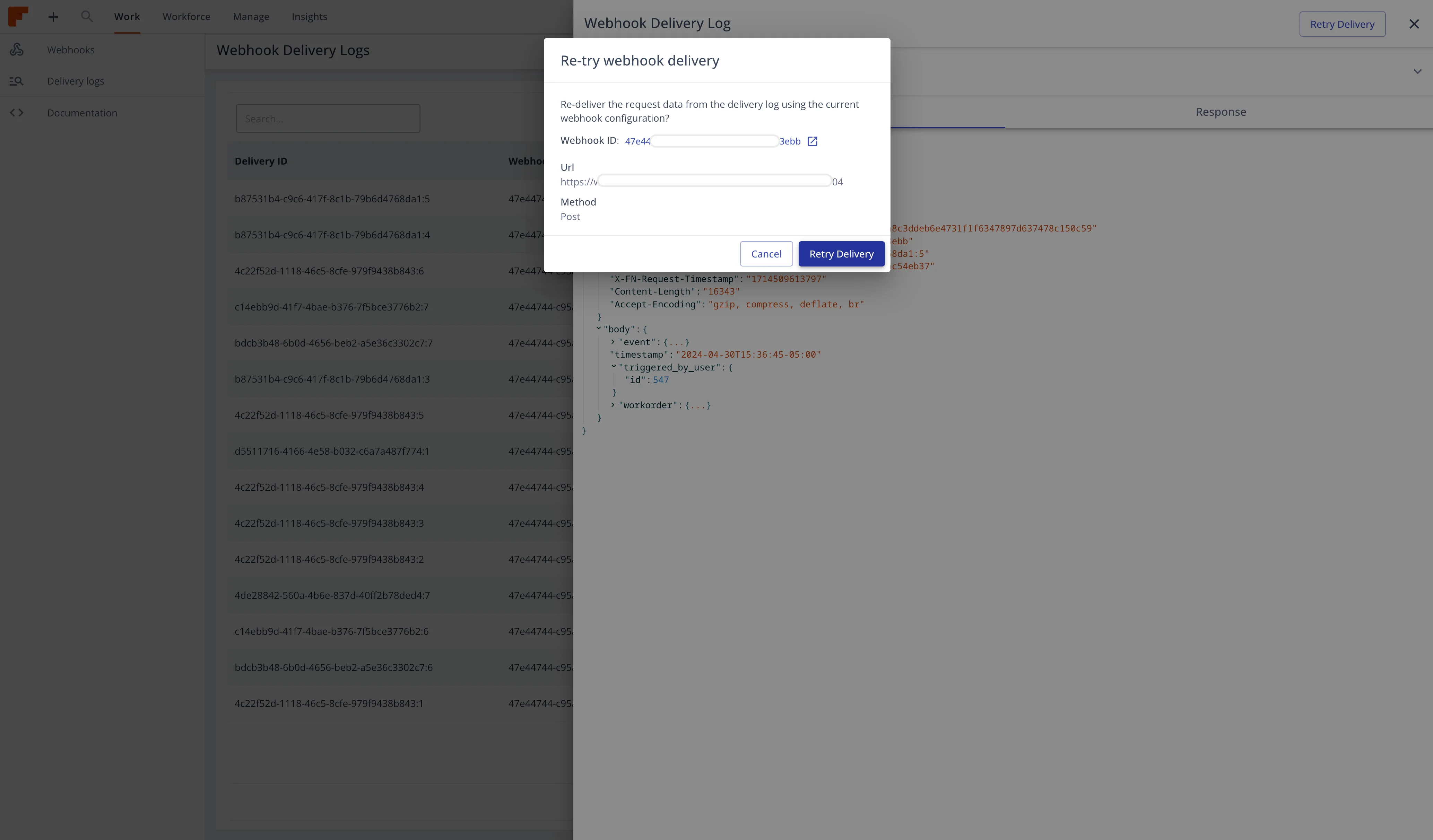
This creates a new delivery job that you can track in delivery logs.
To prevent infinite failed delivery attempts, webhooks are automatically deactivated under certain conditions:
active to inactivenotificationEmail (if configured)Update webhook status to active after fixing endpoint issues:
curl -X PUT https://api-sandbox.fndev.net/api/v1/webhooks/wh_abc123 \
  -H "Authorization: Bearer YOUR_ACCESS_TOKEN" \
  -H "Content-Type: application/json" \
  -d '{
    "status": "active"
}'Important: Fix the underlying issues before reactivating. Repeated deactivations may result in permanent suspension.
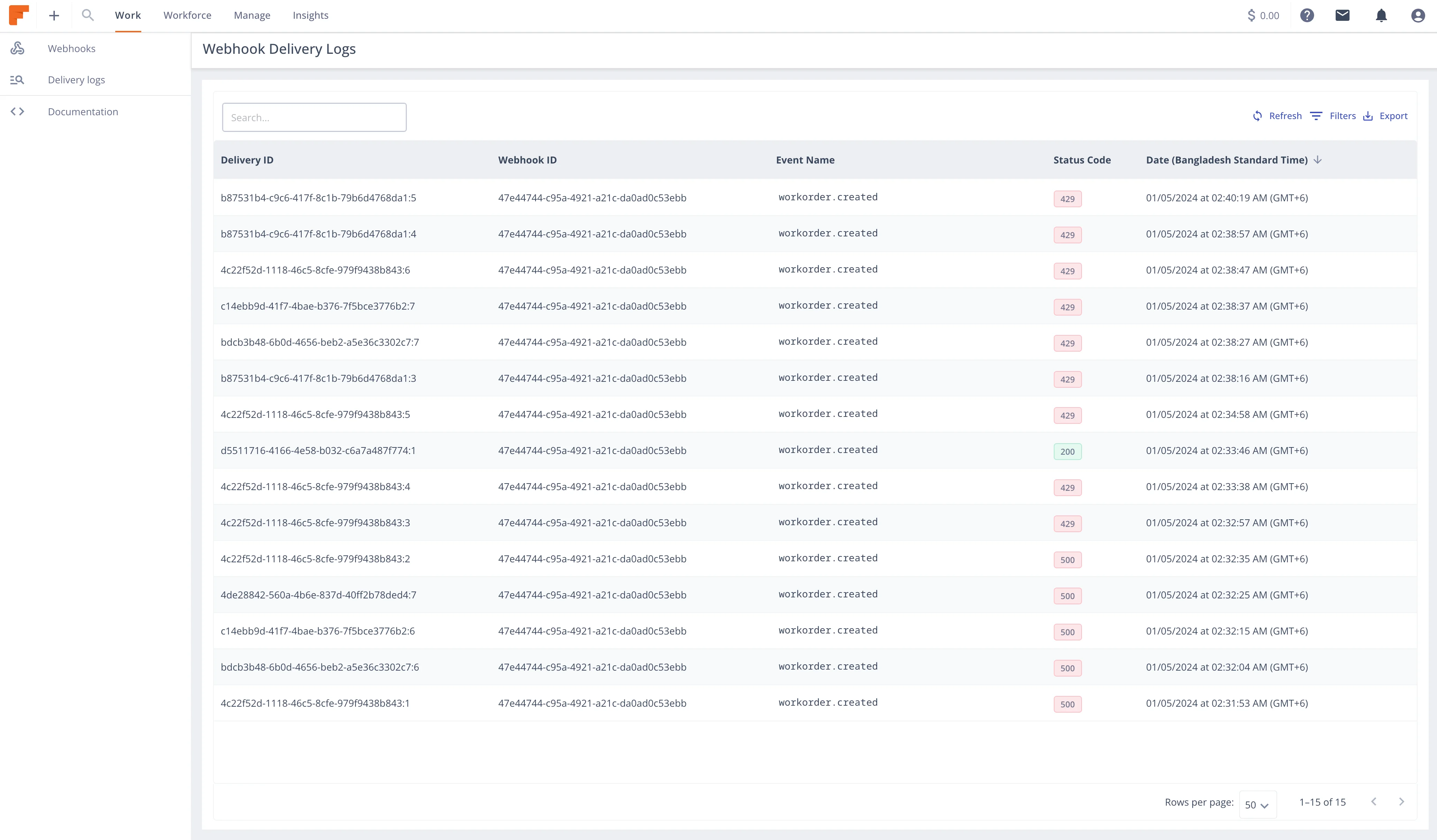
Every delivery attempt is logged with complete details:
{
  "deliveryId": "del_xyz789",
  "webhookId": "wh_abc123",
  "workOrderId": 12345,
  "eventName": "workorder.status.published",
  "deliveryStatus": 200,
  "deliveryAttempt": 1,
  "requestUrl": "https://your-endpoint.com/webhooks",
  "requestMethod": "POST",
  "requestHeaders": {
    "content-type": "application/json",
    "x-fn-signature": "sha256=...",
    "x-fn-webhook-id": "wh_abc123"
  },
  "requestBody": "{...full payload...}",
  "responseStatus": 200,
  "responseHeaders": {
    "content-type": "text/plain"
  },
  "responseBody": "OK",
  "responseTime": 145,
  "createdAt": "2026-01-15T10:30:00Z"
}Via API:
# List delivery logs
curl -X GET "https://api-sandbox.fndev.net/api/v1/webhooks/delivery-logs?webhookId=wh_abc123" \
  -H "Authorization: Bearer YOUR_ACCESS_TOKEN"

# Get specific delivery details
curl -X GET https://api-sandbox.fndev.net/api/v1/webhooks/delivery-logs/del_xyz789 \
  -H "Authorization: Bearer YOUR_ACCESS_TOKEN"
Via UI:
app.post('/webhooks', async (req, res) => {
  // Acknowledge immediately
  res.status(200).send('OK');

  // Process asynchronously
  processWebhookAsync(req.body)
    .catch(error => {
      console.error('Async processing error:', error);
      // Log error, but response already sent
    });
});Handle duplicate deliveries gracefully:
async function processWebhook(payload) {
  const { eventId } = payload;

  // Check if already processed
  const processed = await redis.exists(`event:${eventId}`);
  if (processed) {
    console.log(`Already processed: ${eventId}`);
    return;
  }

  // Process the event
  await handleEvent(payload);

  // Mark as processed (TTL: 7 days)
  await redis.setex(`event:${eventId}`, 604800, 'true');
}app.post('/webhooks', async (req, res) => {
try {
// Verify signature
if (!verifySignature(req.body, req.headers['x-fn-signature'])) {
return res.status(401).send('Invalid signature');
}
// Acknowledge success
return res.status(200).send('OK');
} catch (error) {
if (error.code === 'VALIDATION_ERROR') {
// Client error, no retry needed
return res.status(400).send('Invalid payload');
}
// Server error, retry appropriate
console.error('Processing error:', error);
return res.status(500).send('Internal error');
}
});// Implement circuit breaker for downstream services
const circuitBreaker = new CircuitBreaker(async (payload) => {
await syncToSalesforce(payload.data);
}, {
timeout: 3000, // 3 second timeout
errorThresholdPercentage: 50,
resetTimeout: 30000 // Try again after 30 seconds
});
async function processWebhookAsync(payload) {
try {
await circuitBreaker.fire(payload);
} catch (error) {
// Log error, webhook already acknowledged
await logFailedProcessing(payload.eventId, error);
}
}Set up alerts for:
// Example CloudWatch metric
await cloudwatch.putMetricData({
  Namespace: 'Webhooks',
  MetricData: [{
    MetricName: 'DeliveryFailures',
    Value: failureCount,
    Unit: 'Count',
    Timestamp: new Date()
  }]
});Field Nation guarantees at-least-once delivery:
Events are delivered approximately in order, but strict ordering is not guaranteed:
async function processWorkOrderEvent(payload) {
  const { workOrderId, timestamp, data } = payload;

  // Fetch current work order state
  const currentState = await getWorkOrder(workOrderId);

  // Check if event is stale (older than current state)
  if (new Date(timestamp) < new Date(currentState.updatedAt)) {
    console.log(`Stale event ignored: ${payload.eventId}`);
    return;
  }

  // Process the event
  await updateWorkOrder(workOrderId, data);
}| Error | Cause | Solution |
|---|---|---|
| Connection timeout | Endpoint slow to respond | Optimize response time, use async processing |
| SSL certificate error | Invalid/expired certificate | Renew SSL certificate |
| DNS resolution failed | Domain doesn't resolve | Check DNS configuration |
| Connection refused | Server not listening on port | Verify server is running, check firewall |
| 502 Bad Gateway | Reverse proxy misconfiguration | Check nginx/load balancer config |
Complete troubleshooting guide →
Last updated on
