minimal guide to Field Nation's architecture, lifecycle, and core concepts
Before you write code, it is critical to understand Architecture (Space) and Lifecycle (Time). Field Nation is a marketplace state machine. Your integration essentially moves a Work Order through specific states.
How does your system connect to ours? There are two primary paths:


| Layer | Description |
|---|---|
| Broker Layer | The "Low Code" path. Middleware that translates your system's data (Salesforce, ServiceNow) into Field Nation work orders automatically. |
| Client API | The "Full Control" path. Your custom code speaks directly to our REST API. You handle auth, retries, and logic. |
| FN Core | The heart of the platform where Work Orders, Providers, and Financials live. |
The Work Order is the atomic unit of Field Nation. It flows through a strict state machine. Your integration's job is to trigger these transitions or react to them.
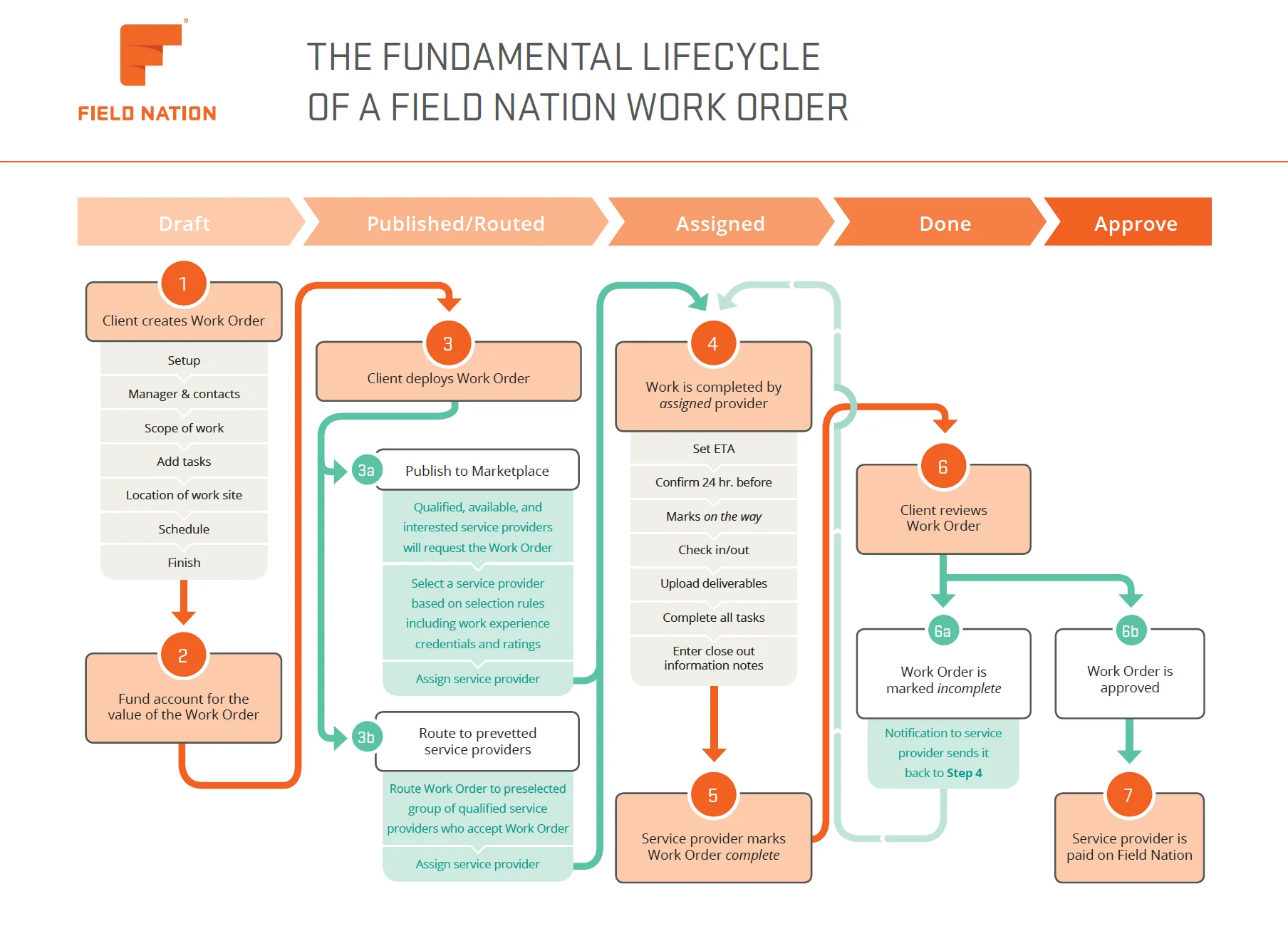
Draft work orders are not visible to providers in the marketplace. You can fully edit and change all work order details while in this status.
Publishing a work order makes it visible in the marketplace, allowing providers to review the details and request the work. You can review the profiles of the requesting providers and assign the best-qualified technician.
Routing a work order sends it directly to specific provider(s) of your choosing. The routed providers can review the work details and accept the work. The first provider to accept the route is automatically assigned.
Once a provider is assigned (either by accepting a route or being selected from requests), the work order moves to the assigned state. A binding contract is formed.
Upon the scheduled start time, the provider will travel to the site and begin performing the work. Once all requirements and tasks are finished, the provider will mark the work order as complete.
Work orders in the done state are indicating the technician has completed the work and the deliverables are ready for your review. Approve the work order if you are satisfied with the work completed and the provided documentation.
Payment processing for Approved work orders happens automatically (typically once a week on Friday), based on the payment terms listed in the work order contract.
While not strict linear statuses, it is important to monitor work orders that are In-flight (scheduled for today or tomorrow) or have an Issue (a problem reported by the provider on-site). API integrations often hook into these events to alert dispatchers.
The pieces on the board.
Buyer
That's you. The company posting work. You define the What (Task), Where (Location), and How Much (Pay).
Provider
The independent technician. They have Skills, Ratings, and Equipment. They are not employees; they are marketplace participants.
Work Order
A single job at a specific location. Contains:
Project
A container for grouping 100s of similar Work Orders. Useful for "Rollouts" (e.g., "Upgrade POS at 500 stores").
Service Window
The allowed time range. Can be Fixed (Start at 9:00 AM) or Flexible (Between 9:00 AM and 5:00 PM).
Talent Pool
A saved list of your "Favorite" providers. Use this to route work to people you trust first.
Last updated on
